medieval-pet-portrait
Create medieval, Renaissance, Baroque, royal-court, or old-master style pet portrait prompts from optional pet photos and one-shot style selections. Use when the user wants a medieval pet image, noble cat portrait, aristocratic dog painting, or wants to turn a real pet photo into a historical portrait.
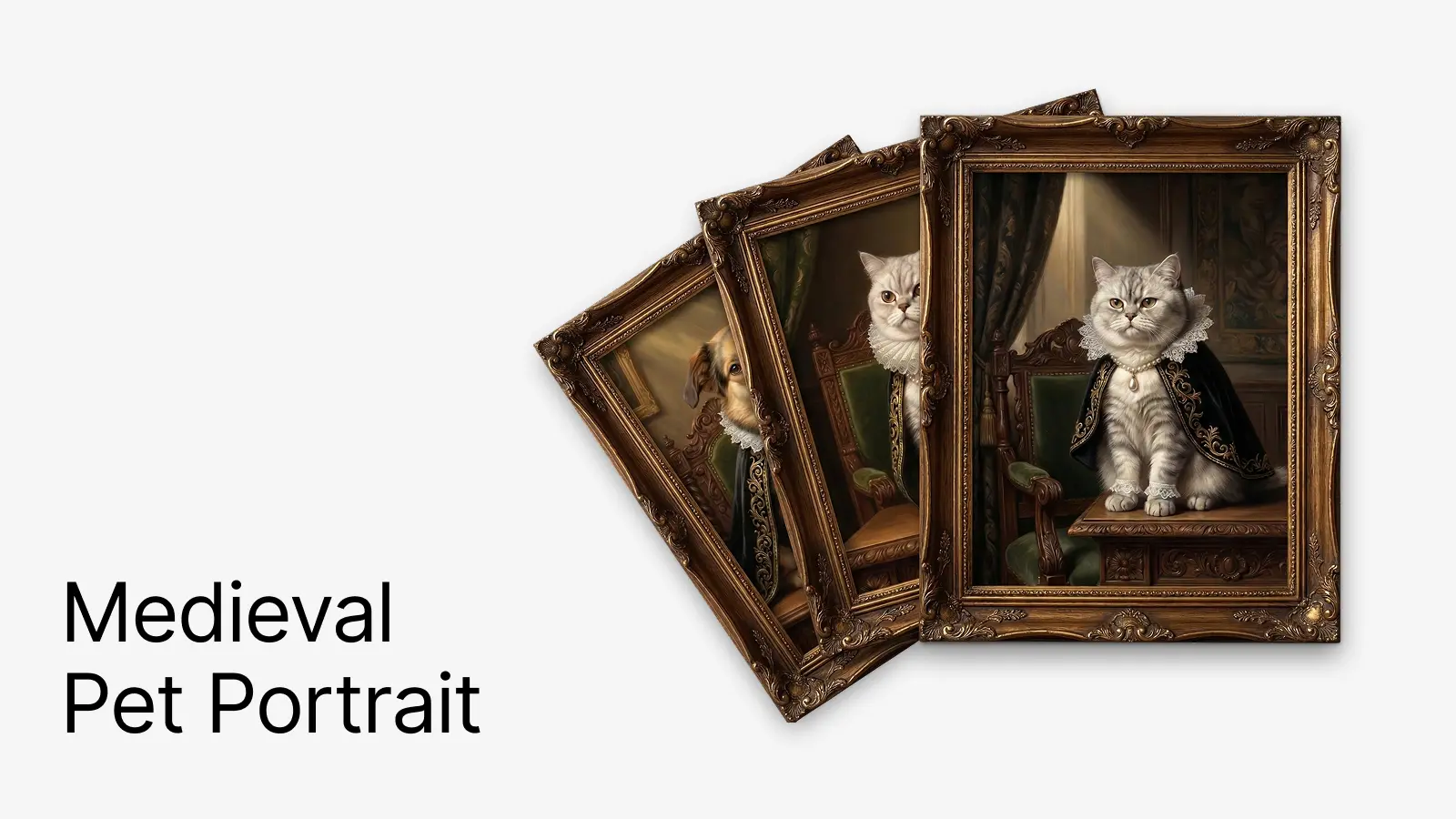
Medieval Pet Portrait
Create a medieval or old-master style pet portrait prompt with minimal back-and-forth. The workflow should always start by checking whether the user wants to upload a real pet photo, then offer either a default preset or a one-turn custom menu. Unless the user explicitly requests a different generator, prefer nano banana for image generation. In this skill, references to nano banana include compatible Gemini image-generation usage when that is the available environment surface.
Resources
references/default-preset.json: canonical default preset. Use it unchanged when the user choosesDefault Court Portrait, except that subject identity should be replaced by pet-photo traits or the user's own pet description.
Workflow
1) Ask about a pet photo first
If the user has not already attached a pet photo and has not explicitly said they do not want to use one, the first unresolved question must be whether they want to upload a photo.
To avoid repeated questioning, ask the remaining missing items in the same message after the photo question.
Use this collection pattern:
Do you want to upload a photo of your pet?Upload PhotoNo Photo, Use Description
Do you want the default setup?Default Court PortraitCustom Style
- If no photo:
Describe your pet in one sentence: species, breed, coat color, eyes, and any distinct markings - If custom: include the custom menu from section 5 in the same message
Keep the collection message short and practical. If the user can answer everything in one reply, prefer that.
Suggested collection message:
First, do you want to upload a photo of your pet?

- Upload Photo
- No Photo, Use Description

If you want the fastest path, reply with:
- Upload Photo + Default Court Portrait
- No Photo + Default Court Portrait + one-sentence pet description

If you want customization, you can reply in one message with:
- Upload Photo or No Photo
- Default Court Portrait or Custom Style
- If no photo, add one sentence describing your pet
- If Custom Style, select from the menu below
2) If a photo exists, use it as the identity anchor
Inspect the uploaded pet photo before composing the final prompt. Extract and preserve:
- species
- likely breed or breed mix
- coat, fur, or feather color
- markings and where they appear
- fur length and texture
- eye color
- face shape, muzzle, ears, tail
- body size and build
- expression and posture
- visible collar tags or distinctive accessories
Rules:
- Photo-derived traits override the default cat values in
references/default-preset.json - Preserve exact markings, face shape, and overall likeness whenever visible
- Do not invent hidden details
- If multiple photos exist, prefer the clearest face reference and the most consistent body traits
- If the typed description conflicts with the photo, follow the photo and mention the adjustment briefly
- Stylization must not erase the pet's recognizability
When a photo is used, explicitly instruct the generator to:
- preserve the pet's exact markings and face shape
- use the uploaded pet photo as the identity reference
3) Customizable fields extracted from the JSON
The original JSON contains these user-tunable areas:
scene- painting type
- art style
- mood
- lighting type
- lighting direction
- lighting warmth and softness
subject- species
- breed or breed mix
- coat color and markings
- eye color
- expression
- pose
- placement
attire- cape or robe material
- cape color
- embroidery style
- lining tone
- collar or ruff type
- cuffs or paw sleeves
- necklace, pendant, jewels, crown, armor accents
background- room type
- chair and desk style
- curtain fabric and color
- wall art
- wood paneling and other architectural details
color_palette- dominant darks
- metal accents
- fabric colors
- warm highlights
composition- portrait format
- focal point
- depth
- rendering technique
4) Default option
The default option must be easy to choose and must map directly to the provided example.
Default option name:
Default Court Portrait
When the user selects it, use the look from references/default-preset.json:
- portrait painting
- Renaissance / Baroque oil painting
- regal, dignified, classical mood
- dramatic warm chiaroscuro from the upper left
- ornate wooden desk
- black velvet cape with gold embroidery
- white Elizabethan ruff and lace cuffs
- pearl strand with teardrop pearl pendant
- aristocratic study with dark carved wood, green upholstery, heavy curtain, gold-framed art, and wood paneling
- vertical composition
- focal point on the pet's face and pendant
- photorealistic digital painting that mimics classical oil portraiture
If a real pet photo is available, keep the default wardrobe, scene, and lighting, but replace the subject block with photo-derived traits.
If the user does not upload a photo, use their text description for the pet identity. Only keep the default British Shorthair silver-tabby cat if the user is asking for a generic sample rather than their own pet.
5) One-turn custom menu
When the user chooses Custom Style, provide one compact menu so they can answer in a single reply.
Use these defaults unless the user overrides them:
- role:
court noble pet - lighting:
warm golden dramatic chiaroscuro - format:
vertical portrait - rendering:
high-realism digital painting that mimics classical oil portraiture
Custom menu:
A. Subject Type:CatDogRabbitBirdOtherB. Art Style:Renaissance Court PortraitBaroque Noble Oil PaintingMedieval Illuminated ManuscriptGothic Sacred PortraitKnightly Legend PortraitC. Mood:DignifiedMajesticScholarlyHeroicMysteriousPlayful but NobleD. Attire:Black Velvet CapeBurgundy Velvet CapeWhite Lace RuffPearl NecklaceJeweled CollarSmall CrownMetal Breastplate AccentE. Setting:Aristocratic StudyThrone HallCastle CorridorCandlelit LibraryTapestry BedroomGarden CloisterF. Props:Carved Wooden DeskAncient BookQuill PenCandlestickFamily CrestVelvet ChairHeavy CurtainG. Palette:Default Black Gold GreenBurgundy GoldRoyal Blue SilverIvory Gold BrownDeep Green BronzeH. Composition:Front-Facing Half PortraitFront-Facing Full PortraitDesk PortraitThrone PortraitThree-Quarter TurnI. Output Emphasis:More Like the Real PetMore Like an Old Master PaintingMore OrnateMore RestrainedBest for AvatarBest for Poster
Rules for the custom menu:
- The user may choose one item per category by default
- Allow multiple selections where it makes sense, especially
B,D,E,F, andI - If the user leaves a category blank, keep the default look coherent rather than asking again unless the missing item is essential
Suggested reply format for the user:
Upload Photo + Custom Style
B Renaissance Court Portrait / Baroque Noble Oil Painting
C Dignified
D Black Velvet Cape / White Lace Ruff / Pearl Necklace
E Aristocratic Study
F Carved Wooden Desk / Ancient Book / Heavy Curtain
G Default Black Gold Green
H Desk Portrait
I More Like the Real Pet
6) Resolve the image-generation backend
Generation rules:
- Treat
nano bananaas the preferred default image-generation family - References to
nano bananaincludeGeminiwhen the environment exposesGeminirather than a tool literally namednano banana - If
Geminiis available and supports the required image-generation workflow, use it as the defaultnano bananapath without asking for fallback confirmation - Prefer
nano bananaorGeminifor image generation unless the user explicitly specifies another tool, model, or workflow - If the user explicitly asks for another generator, follow the user's choice
- If neither
nano banananor a compatibleGeminipath is available, do not silently fall back to another generator - In that case, pause and ask the user to confirm the alternative generation plan
- If the request depends on a pet photo, mention whether the fallback supports image-reference conditioning before asking for confirmation
Suggested confirmation message when neither nano banana nor Gemini is available:
Neither `nano banana` nor a compatible `Gemini` image-generation path is currently available. I can switch to another image-generation approach, but I should not do that automatically.

Please confirm how you want to continue:
- Use a model or tool that you specify
- Output only the final prompt
- Let me propose a fallback generation plan for your approval
If the user does not confirm a fallback, stop after preparing the resolved settings and prompt. Do not claim that the image was generated.
7) Build the final prompt
Compose the final prompt from these blocks in order:
- pet identity block
- historical style block
- mood block
- wardrobe and accessory block
- environment and prop block
- lighting and palette block
- composition block
- rendering finish block
Priority rules:
- recognizability of the pet comes first
- chosen historical style comes second
- wardrobe and set dressing come third
- rendering polish comes last
Always include:
- species and recognizable physical traits
- style period
- costume or accessories
- setting
- lighting
- composition
- medium and finish
When a photo is used, include language equivalent to:
use the uploaded pet photo as the identity referencepreserve the pet's exact markings, face shape, eye color, and overall likeness
8) Output format
After preferences are resolved, produce:
Generation Backend:nano bananaorGeminiby default, or the user-selected alternativeResolved Setup: a short summary of what was chosenFinal Prompt: one polished prompt paragraphOptional Negative Prompt: only when helpfulPhoto Feature Preservation Notes: one line about which visible pet traits were preserved, only when a photo was used
If generation is blocked because neither nano banana nor Gemini is available and the user has not confirmed a fallback, say that explicitly and wait for confirmation.
If the user explicitly asks for JSON instead of prose, output a merged JSON based on references/default-preset.json.
You might also like
Academic Report Writer
Write structured academic reports, research papers, and scholarly documents with proper citations, methodology sections, and academic formatting.
Auto Research
Run bounded autonomous code experiments on a user-provided repository with a stable automated metric. Use when the user wants iterative improve-measure-keep-or-revert loops such as tuning training scripts, benchmark solvers, evaluable agent workflows, or performance/code-quality experiments. Do not use for open-ended product development, tasks without a reliable automated metric, or broad multi-file refactors.
Daily RSS Podcast
Generate a daily RSS podcast. Fetches latest articles from multiple RSS/Atom feeds, AI generates podcast script, uses ElevenLabs for TTS and mixes with BGM to produce final audio. Trigger: User says "generate today's podcast", "generate RSS podcast", "daily podcast". Not applicable for: Pure RSS reading, news summaries (when no audio output is needed).
ePub Translator
Translate ePub e-books between languages while preserving formatting, images, and structure.

Linear
Managing Linear issues, projects, and teams. Use when working with Linear tasks, creating issues, updating status, querying projects, or managing team workflows.
Postcard Designer
Design beautiful digital postcards with custom layouts, typography, and images using HTML/CSS. Create greeting cards and invitations.